
Chat and Execution
The Chat page carries Agent collaboration inside a project context. It is where the Chat stage lands on the main path. Agents analyze requirements, inspect code evidence, guide tradeoff discussions, converge on decisions with you, and then move toward Proposal and Apply & Archive.
Main Capabilities
- Manage sessions in the Workspace
- Reach, refresh, and locate every real session through its own
/chat/<session-id>URL - Search current-Workspace session history by title, Session ID, or conversation text
- Pin important sessions into a separate group, with the pinned state restored after restart
- Collapse Pinned Sessions and Recent Sessions independently; a short pinned group shrinks to its content and Recent Sessions uses the remaining height
- Select installed ACP Agents
- Select
FylloCodeor原生(Native) mode before the first message - Inspect and change Agent-provided Session configuration from one menu
- Inspect the fixed Session scope in the Chat header, including snapshot-only and stale members
- Copy the current FylloCode Session ID from the Chat header
- Send text and attachment context
- Display Agent reasoning, tool calls, subagent calls, streamed output state, and file changes from the current turn
- Delegate focused work to other installed ACP Agents and inspect synchronous or background spawned Sessions
- Render structured content such as Mermaid and Markdown
- Safely preview absolute local paths supplied through Markdown or tool Locations
- Create proposals and continue later stages inside task context
- Show a source task banner for task-based sessions, including after reopening the session
- Let Agents propose task creation, submit a plan for review, and flag or request review of knowledge entries through fyllo-action, with FylloCode taking over execution after your confirmation
- Let Agents display lightweight information that requires no confirmation through Fyllo Signal; Signals do not enter the session event rail
Managing Session Groups
Pinned Sessions and Recent Sessions are each sorted by recent activity, and every non-empty group can be collapsed independently. When both are expanded, the pinned group uses its natural content height up to 50% of the available list height; Recent Sessions takes the remaining space. Overflow scrolls inside each group. If only one group exists or remains expanded, it uses all space below the group headers.
Collapsing a group does not interrupt background execution, and expanding it restores the previous scroll position. Collapse state lasts only for the current Chat-sidebar mount and is not written to session metadata.
Searching Session History
Select Search Sessions beside New Session to search the current Workspace by title, FylloCode Session ID, or visible User and Assistant conversation text. Search does not cross Workspaces and excludes reasoning, Tool input and output, attachments, and system reminders. Results prioritize title matches, then Session ID matches, then message matches; each category is ordered by most recent update, with at most 50 results.
The input waits briefly before querying, and one search window never scans multiple histories in parallel. Results show the session title, update time, and a conversation snippet when available. Opening a result uses the normal session-opening flow without changing pin state or list order. Search reads existing session records directly and creates no index or cache file.
Adjusting Session Configuration
When an Agent provides Session configuration, the composer shows one configuration button. The button prioritizes the current values as “model · thought level,” shows either value when only one is available, and falls back to Config when neither category exists. The button is hidden when there is no visible configuration.
The menu presents select configuration through submenus and boolean configuration as top-level checkboxes. It preserves the Agent's option order. After a change, FylloCode refreshes the summary, current values, and available options from the Agent's complete configuration snapshot, so related changes such as a model updating its thought levels appear together.
Choosing a Session Mode
A new session offers FylloCode and 原生 (Native) above the composer, with FylloCode selected by default. After the first message, the mode is fixed in Session metadata and appears as a badge in the Chat header. An existing Session cannot change modes. Historical Sessions without this field are read as FylloCode.
FylloCodeuses the Workspace scope fixed when the Session was created, provides built-in MCP servers, and injects collaboration context such as specs, guidelines, knowledge, Task, and Fyllo Action / Signal contracts.原生(Native) uses the same fixed Workspace scope and Agent-provided Session configuration, but provides no FylloCode bundled MCP servers and injects no FylloCode system or history reminder.
Native mode is useful when you only need a desktop interface for the Agent CLI. It does not change Proposal Apply, Archive, or other flows started internally by FylloCode.
Sending Text and Attachments
Every user message must contain text that remains non-empty after trimming; attachments cannot be sent alone. Images and files selected in a new-session draft remain local previews and do not create or activate a Session. When the first message is sent, FylloCode creates one Session, then persists every attachment and the message under that identity.
Besides choosing files from the attachment menu, you can paste clipboard images into the composer or drop images and regular files onto the Chat prompt. Pasting does not block the browser from inserting clipboard text, so text and images can enter the same draft. File drops are handled by FylloCode, while dragged text keeps its native behavior. The first version does not read directories: dropped directories are rejected with feedback, while supported files from the same batch can still be accepted.
FylloCode checks each attachment against the current Agent's image and embedded-context capabilities. A mixed batch keeps only supported items and reports rejected images, files, or directories in one summary. Rejected items create no preview, attachment record, or Session.
If Session creation, attachment storage, or the first message write fails, FylloCode removes the uncommitted Session and its attachment copies while preserving the text and local attachment draft for retry. Attachments selected in an existing Session continue to be stored under that current Session.
Copying a Session ID
After opening an existing Session, use Session Actions in the right side of the Chat header and select Copy Session ID. This copies the current FylloCode Session ID, not the underlying ACP session ID, and reports clipboard success or failure. The menu is hidden for a draft because no Session ID exists yet.
Locating Past Messages
When the current session has at least two user prompts, a vertically centered floating timeline appears along the left side of the conversation area. Each of 2–10 prompts gets a guide; longer conversations stay at 10 guides, while the full rail still maps continuously to every prompt. A separate teal thumb follows the current reading position, so the timeline does not keep growing or reduce the message-column width.
Hovering or using the arrow keys shows up to five nearby prompt summaries. Clicking the timeline or pressing Enter pins the complete prompt list, which scrolls independently and lets you locate any message by selecting its summary. Dragging or using the mouse wheel moves through prompts quickly, Home and End jump to the boundaries, and Escape closes the summary popover. The timeline is hidden when there are fewer than two prompts.
Reading Agent Activity
The currently streaming assistant message shows a runtime indicator after the content already received, with generic status text and elapsed time in natural units. The indicator only means the reply is still being processed; it does not infer the Agent's specific action from tool calls. It is removed when the stream finishes, fails, or is cancelled, and historical messages do not retain this runtime state.
Consecutive Thinking and normal tool calls are grouped into a collapsible Activity group. After expanding it, you can inspect each Thinking and Tool separately, including complete Input and Output sections. Failed tools use an error-colored icon and keep the error text in an Error section. Tool titles do not append execution-status suffixes; in-progress tools continue to use shimmer, so hidden status nodes cannot create horizontal overflow when several tools are expanded.
FylloCode recognizes ACP 1.3 tool semantics including read, write, edit, delete, move, search, execute, think, fetch, and switch mode. Direct tools and Activity summaries use the same category and icon. Unknown or future kinds fall back to a generic tool instead of being guessed from the Agent identity.
When a tool returns structured ACP diffs, its Changes section lists the added, modified, or deleted paths associated with that tool. Opening any path shows File Changes in This Turn, which aggregates net changes from visible normal tools in the current assistant message into a read-only Diff list. Files start collapsed and several can be expanded together. This view uses the execution snapshot stored in the message: it does not reread the disk, aggregate the whole Session, or claim to represent current Git or worktree state. Absolute paths and line numbers in Locations open through the existing local-file preview.
When Claude Code starts a subagent through the Agent tool, the parent call appears as a separate card. Opening the details shows the prompt, status, model, tokens, duration, tool statistics, child tool activity, and final response. The details connect only parent-child tool relationships that can be safely confirmed inside the same assistant message; tools that cannot be linked continue to appear as normal tools.
Delegating to Another ACP Agent
When the current Agent supports HTTP MCP and the backend is available, FylloCode mode provides fyllo-spawn. The parent Agent can send a well-bounded task to another installed ACP Agent synchronously or as a background turn. Spawned Agents share the fixed Workspace directories of the parent Session, so parallel delegations should use non-overlapping file scopes.
Every real session has its own /chat/<session-id> URL, so task pages, session search, and lineage can open it directly and a refresh restores the same session; /chat itself remains the draft entry before the first message is sent. An invalid, missing, or out-of-Workspace session route falls back to /chat with a notice.
After a spawned Session is created, Main automatically exposes every spawned Session owned by the current parent Session in an activity bar at the bottom of the conversation area. The bar shows the total as 子 Agent N plus how many are running; opening it lists each Session — active first, then by most recent update — with its Agent, synchronous or background mode, status, prompt preview, and update time. Opening a Session shows a read-only detail Slideover organized by Turn: the latest Turn is selected by default, earlier Turns can be switched to, and each Turn shows its original prompt, aggregated Activity, compacted Transcript, status, and response IDs. These entries are read-only and cannot continue, cancel, or retry work; switching Sessions shows only the child Agents of the new parent Session.
A spawn.session Signal in historical assistant text still opens the same details as a deep link, but it is now an optional contextual entry point and no longer carries Session discovery or status updates. When a background spawned turn completes, its completion notification streams into the parent Session like a normal reply; during that turn the Session shows a running state and sending is temporarily disabled, and multiple pending notifications for the same Session are delivered one at a time in order.
Closing a Workspace window does not turn the UI into the task's source of truth; reopening the window queries Main again. Background turns do not continue across application processes, and unfinished records appear as interrupted after restart. See the fyllo-spawn MCP reference for tools, capacity, inactivity, and response-reading contracts.
Inspecting Context Usage
After an existing Session reports token usage, the composer shows its Context percentage. Usage below 75% uses the normal color, 75% turns yellow, 90% turns orange, and 95% turns red. The tooltip always shows current Context use and adds guidance to watch usage, summarize the conversation, or start a new session as risk increases. Cost and Remaining are not shown in this tooltip, although the underlying usage data remains available to the application.
Session Scope
When a multi-root ACP Session is created, FylloCode fixes the Workspace member snapshot at that moment. Agents with additional-directory support can access multiple authorized Projects at once; later Workspace additions, removals, or relocations do not change a running Session. The Chat header scope popover lists each Project, its path, and the primary-Project marker, and warns when the current Workspace differs from the Session snapshot. See Multi-root Workspace for the problem it solves and its authorization boundaries.
Previewing Local Files
When an Agent emits a Markdown link or tool Location with a POSIX, Windows drive, or UNC absolute path, opening it uses a read-only window-level Slideover. Files under the roots and registered worktrees of Projects in the current Session snapshot can be read directly. For files outside those trusted roots, FylloCode displays the full canonical path, size, and modification time before reading content, then requires either Open Once or Open and Trust in This Window.
Preview accepts regular UTF-8 text files up to 5 MiB. Directories, devices, binary content, and invalid UTF-8 are rejected. Add :line[:column] to a link to locate source; the preview supports search, selection, and copy, but never save or write-back. Window trust exists only in memory for the current Renderer Window and expires when the window closes or the app restarts.
Every text file can switch between Content Overflow and Wrap Lines. Recognized Markdown files also show Source and Preview modes; Preview renders the current read-only snapshot through shared MarkStream. These display choices reset when the Slideover closes.
Fyllo Signal
Fyllo Signal is a passive display marker emitted inside assistant text. show.time renders a time label as a non-interactive pill. spawn.session uses the parent Session that owns the message to query and open read-only spawned Session details. Signals require no confirmation, create no Action state, do not enter the session event rail, and do not affect pending counts. Historical Signals are rendered again only from saved assistant text. See the Fyllo Signal reference for protocol details.
Session Event Rail
A collapsible rail on the right side of the conversation area collects information that matters but shouldn't interrupt the current discussion:
- Agent agenda: the list of action items the Agent has laid out for this session
- Proposal cards: proposals created in this session and their live status
- Pending fyllo-action items: read-only summaries and navigation entries for rail-type actions such as
knowledge.flagandknowledge.review; confirmation still happens on the inline card in the chat transcript
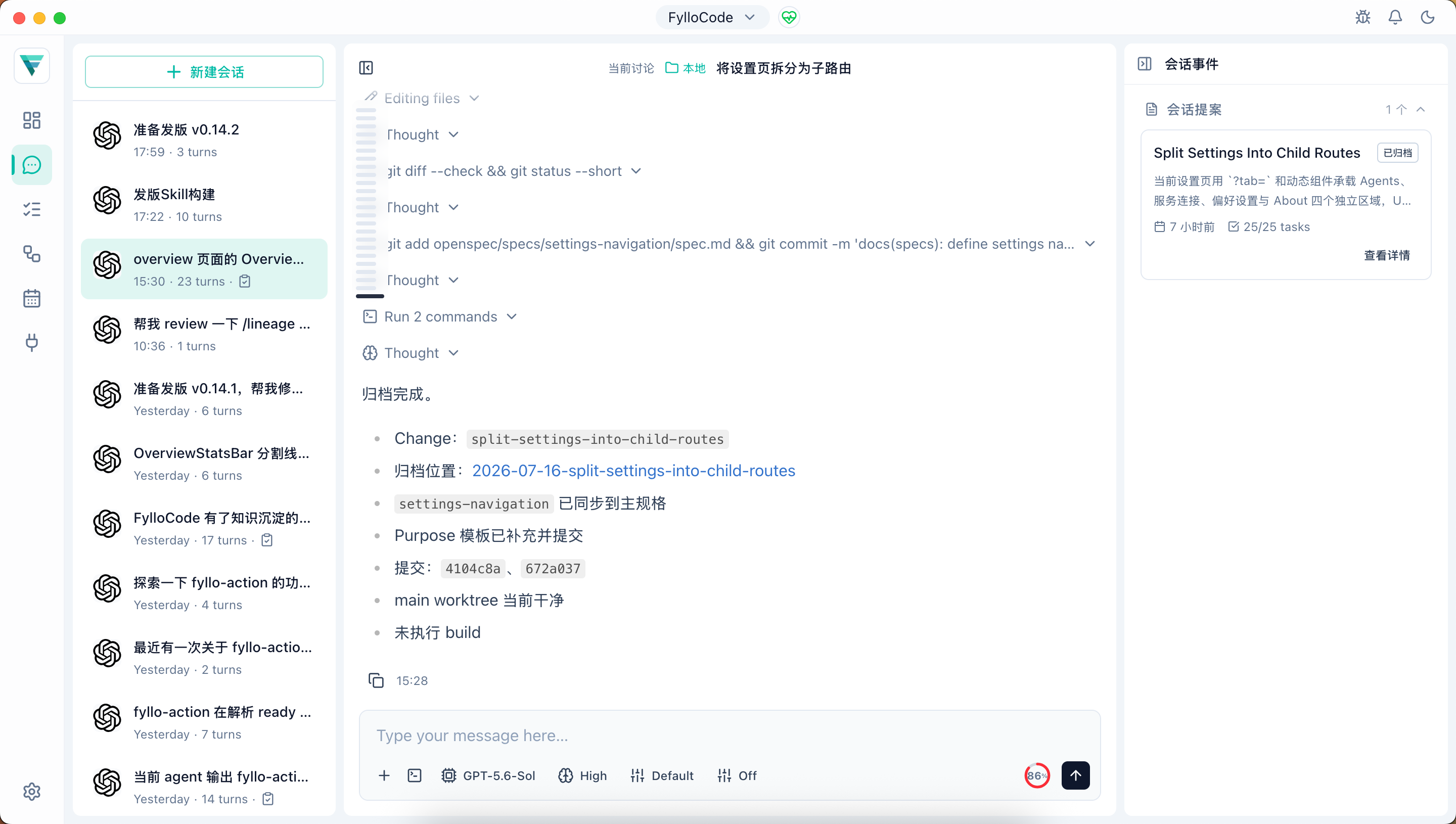
The rail can be collapsed to a narrow strip at any time; its expanded/collapsed state persists across sessions.
Relationship with Lineage
Sessions started from a task are automatically bound to that task's lineage subject. Sessions started directly from Chat create a chat-origin subject, and can later create a task to return to the main path. Proposals created through fyllo-specs are automatically recorded on the same subject, without manual linking.
Working Model
FylloCode mode organizes project specs, historical decisions, task context, and guidelines as Agent-readable background so the Agent works inside clearer boundaries. Native mode keeps the Agent's default behavior and does not inject those FylloCode collaboration capabilities.
Chat moves discussion outcomes into a governable process. When the problem is clear and the decision is made, create a Proposal. After review, enter Apply & Archive so implementation and change records are preserved.