
Work Lineage
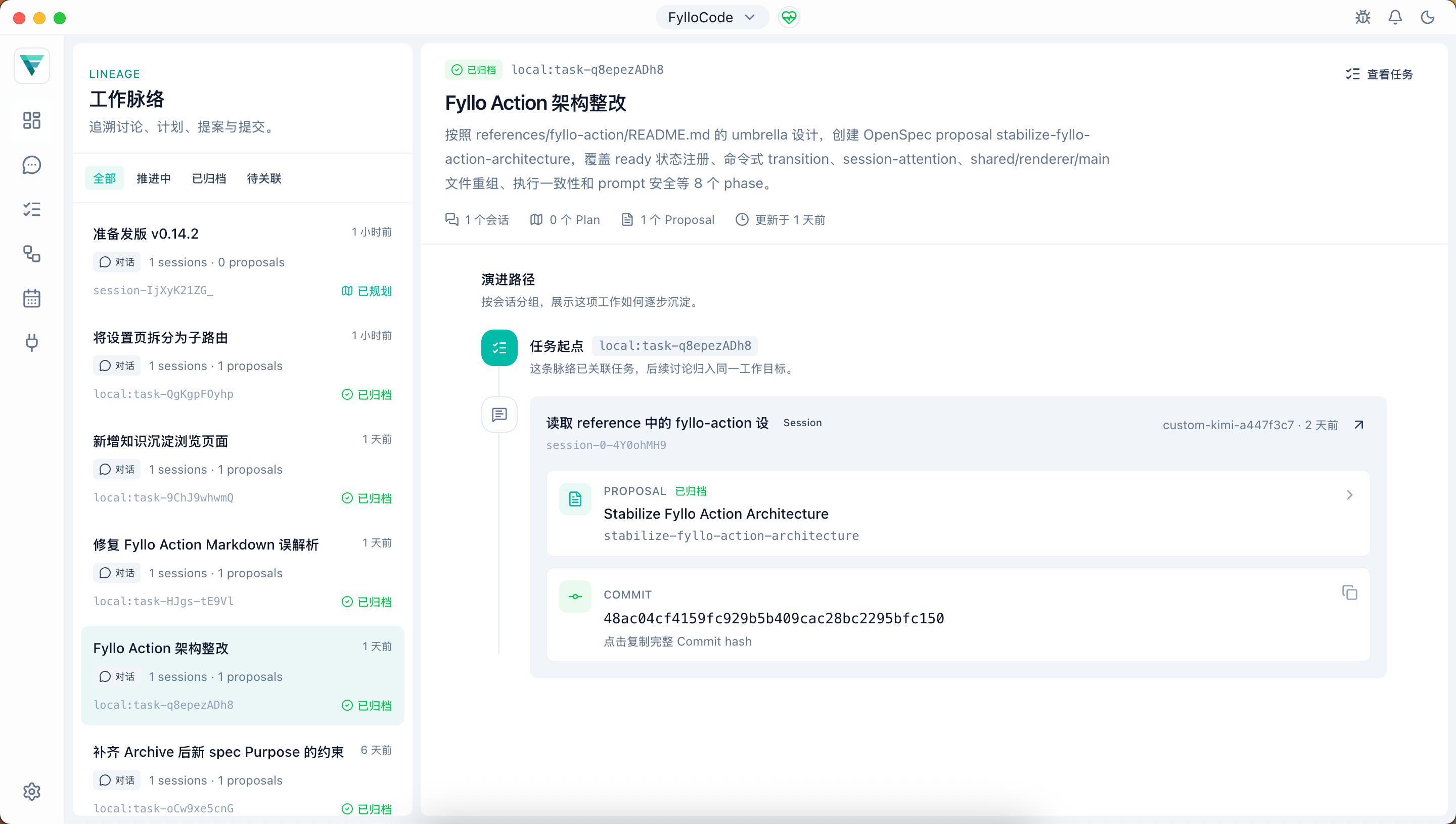
The Work Lineage page lists every lineage subject in the current Workspace. Use it to see where a piece of work started, which Chat sessions and Plans shaped it, which Proposals it produced, and which Commit completed it. The page reads local Workspace data, retains Project/Folder ownership for repository sources, and does not modify lineage, Session, Plan, or Proposal files.
Open /lineage from the Work Lineage entry in the Project Overview governance health card. The page does not add a top-level ActivityBar item.
Browse and Filter
The left list sorts all subjects by most recent update and provides four filters:
| Filter | Entries shown |
|---|---|
| All | Every work lineage in the current Workspace |
| Active | Subjects whose aggregate state is not completed |
| Archived | Subjects with at least one Proposal whose associated Proposals are all archived |
| Unlinked | Subjects that are not linked to a task |
This version does not provide text search. If a filter hides the current selection, the page selects the first visible entry. An explicit filter empty state appears when nothing matches.
Aggregate Status
The list uses one rule set to aggregate Plans and Proposals under a subject into four states:
- Applying: at least one Proposal is in Apply.
- Planned: a creating, draft, or unavailable Proposal exists, or the subject has at least one Plan.
- Completed: the subject has at least one Proposal and every Proposal is archived.
- Discussion: the subject has no Plan or Proposal yet.
Status always includes text and an icon instead of relying on color alone.
Evolution Details
The detail pane starts with the task or Chat origin, then groups the path by Session. Each group can show:
- Session title, Agent, and timestamps;
- Plan slug, goal, and
draftorapprovedstatus; - Proposal change ID, title, and current status;
- A Commit hash linked from an archived Proposal.
You can open an associated Chat session or Proposal detail, go from a task origin to Task Board, or copy the full Commit hash. Plans are read-only on this page. Opening a task goes to /task without automatically opening a specific task card.
If supplemental Session, Plan, or Proposal metadata is missing, the stable ID remains visible and actions that require the missing metadata are disabled. One missing reference does not prevent other lineage entries from loading.
Data and Limits
- Data is a read-only projection of existing lineage subjects, Session metadata, Plan documents, and Proposal metadata.
- The page cannot create, delete, merge, split, or rebind lineage subjects.
- Data reloads when the page opens or the current Workspace changes. A late response from the previous Workspace cannot replace current results.
- A top-level query failure produces a page error instead of presenting partial data as a successful result.
- Workspace migration runs during main-process startup; this page reads the projection after settlement completes.
See Lineage Traceability for how subjects are created, how tasks can be added later, and where lineage data is stored.